
A Moodle course can be re-created when updates or corrections are needed in the course structure, or when you wish to start fresh.
Run this process before lectures have begun to ensure no student or teaching data is lost.
Important: re-creating a Moodle course requires deleting the existing course from your Moodle site. This will permanently remove all course content, user data, logs, and activity records. Once deleted, the data cannot be recovered.
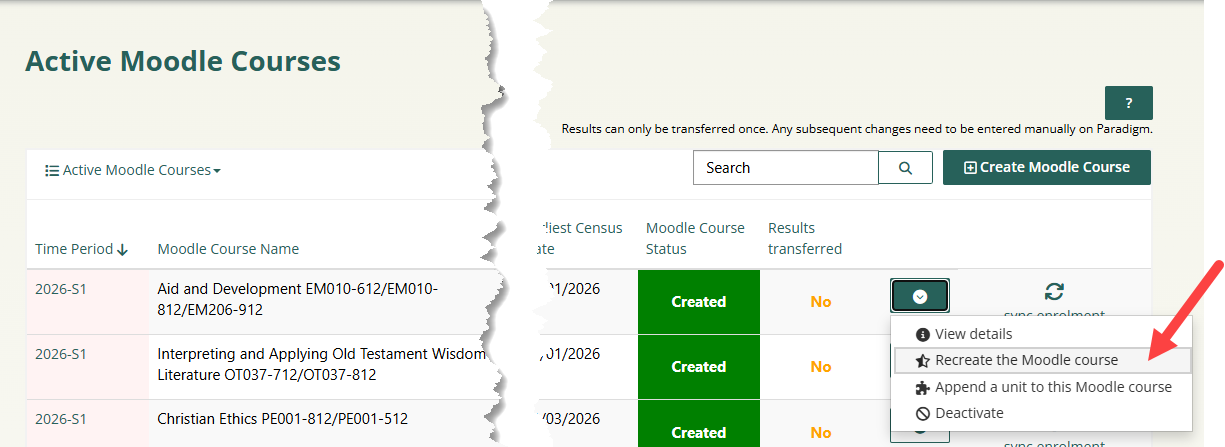
To re-create, click on the action menu of the Moodle course (https://moderation.actheology.edu.au/moodle-courses/) and select 'Re-create the Moodle course'.
Before proceeding, you must delete the existing Moodle course from your Moodle site. This is essential to avoid conflicts with:
- Scheduled Unit IDs
- Scheduled Assessment IDs
A pop-up window will ask you to confirm the process.
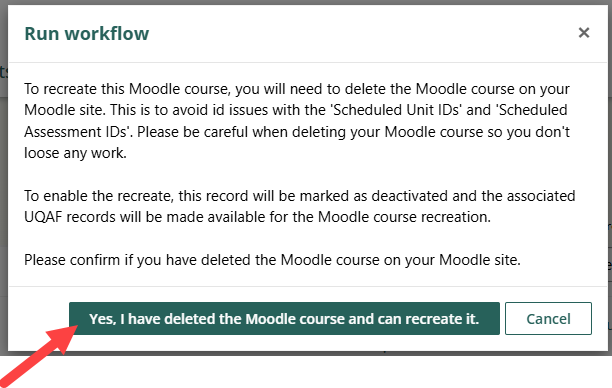
Upon confirmation, the Moodle course record on the Moderation Portal will be marked as deactivated.
The Associated UQAF records will be made available to support the Moodle course recreation.